By Satwinder Singh, who builds BankStatementHub · Updated October 2026
Before writing this I read through recent threads from Chase customers on the Quicken Community, QuickBooks Community and Bogleheads, plus Chase's own help pages, to see where people actually get stuck. Then I ran sample statements in Chase's checking and card layouts through the converter. Below is what's worth knowing.
How to download your Chase statements
On chase.com
- Sign in and open the main menu (the three lines, top left).
- Choose Statements & documents.
- Pick the account, then the year from the drop-down.
- Click the download icon next to each month you need. Each one saves as a separate PDF.
In the Chase app
- Tap the profile icon at the top right.
- Under Document manager, tap Statements & documents, then Statements.
- Choose the account, the year and the month. The statement opens as a PDF you can share or save to Files.
On a phone it's quicker to save the PDFs to Files or Google Drive and convert them on a computer, where you can drop in a whole year at once.
Chase's own download vs the PDFs
Chase spreadsheet download
Chase PDF statements, converted here
| Activity download | PDF statements, converted | |
|---|---|---|
| How far back | About the last 2 years on personal accounts, less on some business accounts | Up to 7 years, depending on the account |
| Where | chase.com only (not the app) | Website or app |
| Opening and closing balance | Not included | Included and checked against the rows |
| Matches what your accountant sees | Close, but pending items and date ranges can differ | Exactly the statement, month by month |
If the months you need are recent, Chase's own download is fine: open the account, choose Download account activity, then Spreadsheet (Excel, CSV). For anything older, or when someone asks for statements rather than an activity export, use the PDFs.
What you get
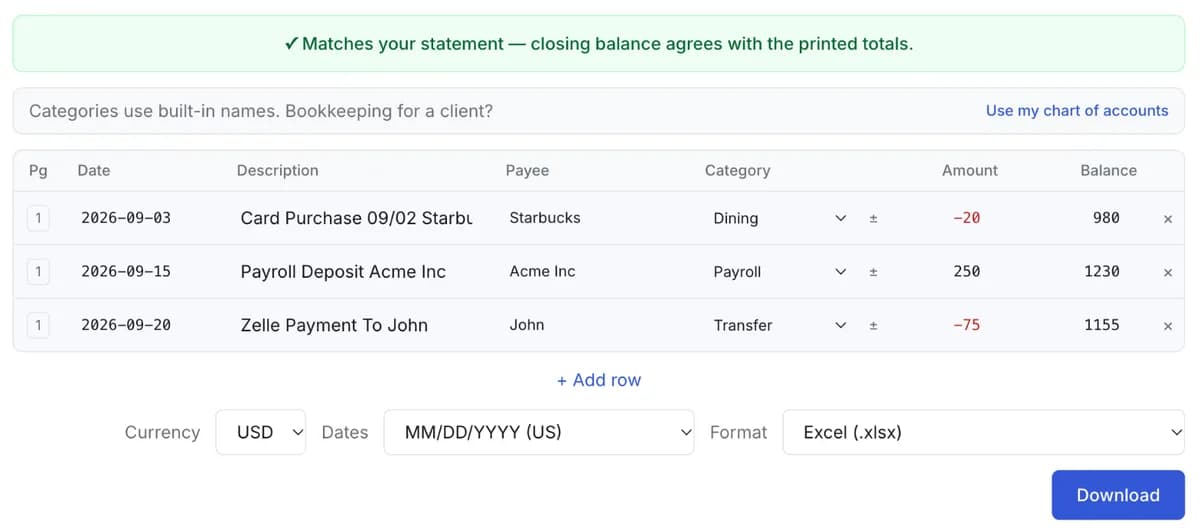
One row per transaction, money out as a minus, and the running balance checked on every row. The Excel file also has a summary sheet with the opening and closing balance and totals by category. CSV, QuickBooks, Xero and Quicken formats are one click away on the review screen.
Where people get stuck with Chase statements
Your budgeting app lost your older Chase history
“…Quicken only downloaded transactions for 2026”
Reconnect a Chase account in Quicken, QuickBooks or a budgeting app and the bank only sends recent transactions again, usually around 90 days. Everything before that is gone from the feed. Your monthly PDF statements still cover up to 7 years, so download the missing years, drop them into Bulk convert, and import the result. Quicken, QIF, OFX and QuickBooks formats are all on the export menu.
The activity download misses transactions
“…it only downloaded 9 of the 25 transactions in the date range I specified”
Pending charges never appear in Chase's download either, so a file pulled mid-month won't match the statement. The PDF statement is the final record. When you convert it here, every row is checked against the running balance and the closing balance, so a missing transaction shows up as a mismatch instead of slipping through.
Acrobat won't let you edit or merge the PDFs
Chase locks its statement PDFs against editing, which is why merging them or adding your own password fails. You don't have to unlock anything to convert them. They open here as they are, with no password to type.
The dates have no year
Chase prints transaction dates as month and day only, like 12/28. The year comes from the statement period at the top of the first page, so a statement running from December into January gets the right year on both sides of New Year.
Card and checking amounts point opposite ways
On a Chase card statement, purchases are printed as positive and payments as negative, which is the reverse of checking. When a card statement is converted here, purchases come out as money out and payments as money in, the same way round as checking. Still, glance at the first few rows on the review screen before you total anything.
You need statements older than 7 years
Those aren't online. Chase will send copies if you ask through secure message or call them. If they arrive on paper, scan them to PDF and convert the scans here. Scanned pages have to be read online, and you're asked before that happens.
Got a stack of Chase statements? Convert them all at once.
Questions
Can I get more than two years of Chase transactions in one CSV?
Not from Chase's activity download. The monthly PDF statements go back further, up to 7 years depending on the account, so download those and convert them in one batch.
Does this work for Chase credit cards, Freedom and Sapphire included?
Yes. Card statements don't print a running balance, so the rows are checked against the totals in the account summary instead: previous balance, payments, purchases and new balance.
Can I import the result into QuickBooks?
Yes. On the review screen, choose QuickBooks Online (CSV) to get a file in the three-column layout QuickBooks Online imports. For recent months Chase also offers QBO and QFX files from the activity download.
What about Chase business accounts?
Business checking statements convert the same way. The PDFs are especially useful here because the activity download on some business accounts covers only a few weeks.
Do my statements get uploaded?
Chase statements downloaded from chase.com are text PDFs, and those are converted in your browser without being uploaded. Only a scanned statement needs online processing, and you're asked before that happens. Files are never stored.
Steps last checked against Chase's help pages in October 2026. Banks move their menus around; if something above no longer matches, tell me. BankStatementHub is not affiliated with or endorsed by JPMorgan Chase & Co.